 KeyProcess Automation Services
Blog · What to automate
Business processes to automate: 15 examples for small businesses, and how to pick the first one
The repetitive work that eats a small team's week, what each process looks like once it runs on its own, and a five-question scorecard for choosing where to start.
The short answer: the best business processes to automate are the ones your team repeats every week by the same rules: following up on leads and quotes, sending reminders, chasing unpaid invoices, preparing paperwork, logging orders and bills, and building recurring reports. Start with the one that costs the most hours and causes the most dropped balls.
Key takeaways
- If a task happens weekly, follows the same steps, and moves information from one place to another, it's a strong candidate.
- Follow-ups, reminders, paperwork, data entry, and reports are where small teams usually win back the most time.
- Score each process on five questions, then automate the highest score first instead of everything at once.
- Don't automate judgment calls, one-off tasks, or a process that's broken. Fix the process first.
- One automated process starts at $1,000 with us, and the right one often pays for itself within months.
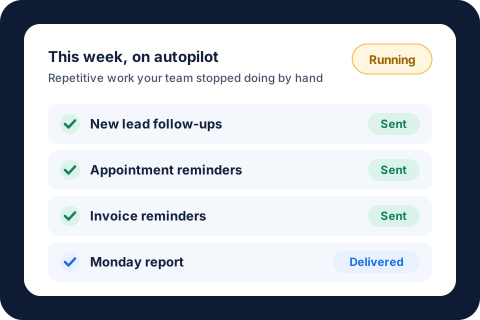
Why are small businesses automating their processes now?
Because the work keeps growing and the people to do it are hard to find. In the NFIB's April 2026 jobs report, 34% of small business owners had job openings they couldn't fill, and 46% said they got few or no qualified applicants. In the Federal Reserve's 2025 Small Business Credit Survey, hiring or keeping qualified staff was the second most common operational challenge employer firms reported, and 77% reported rising costs, tariff costs, or both.
Hiring is also expensive when you can find someone. The Bureau of Labor Statistics puts the median wage for secretaries and administrative assistants at $48,310 a year ($23.23 an hour) as of May 2025, before taxes and benefits. When most of a new hire's job would be follow-ups, data entry, and paperwork, automating that work first lets the team you already have keep up.
What makes a business process worth automating?
A process is worth automating when a computer could do it by following written rules, and doing it by hand costs real hours. Look for these five signs:
- It repeats. It happens every day or every week, not once a quarter.
- It follows the same steps. You could write instructions a new hire could follow without asking questions.
- It moves information. Someone copies details from an email, form, or report into another place.
- Someone has to remember it. It only gets done if a person keeps it in their head or on a sticky note.
- Mistakes or delays cost you. A missed follow-up loses a sale, and a late reminder loses a payment.
The more of these a process checks, the more it gives back once it runs on its own.
15 business processes to automate in a small business
These are the processes we see eat the most time in small and mid-sized businesses, grouped by where they live. Where we've automated the same kind of process for a real business, we've linked the result.
Sales and customers
- New lead follow-up. Every inquiry from your website, phone, or email gets a reply within minutes and a reminder for your team to call. A fast reply keeps you ahead of whoever else they called.
- Quote and proposal follow-ups. Open quotes get a friendly nudge after a few days, then another, until the customer says yes or no. In our experience, most lost quotes aren't lost to a competitor. They're lost to silence.
- Appointment reminders. Customers get a reminder before every visit or call, which cuts no-shows and wasted trips.
- Review requests. Every finished job or delivered order triggers a review request at the right moment, so your best work shows up online without anyone having to remember to ask.
- Customer onboarding. When someone signs, they get the welcome email, the forms to fill out, and the next steps automatically, and your team gets a checklist.
Operations and paperwork
- Approvals and paperwork. Letters, contracts, and packets that follow a template build themselves from the details you already have. In one property management case, preparing an approval packet dropped from up to 2 hours to 5 to 10 minutes, about 55 workdays of staff time saved a year.
- Chasing open jobs and vendors. Anything that stalls gets followed up on a schedule. For one property manager, every vendor with a work order open two weeks or more now gets a personal status request every Monday: 100 to 250 follow-ups a week, about 8 hours saved a month.
- Keeping listings, menus, or catalogs current. New items get added, and price changes and sold-out items get updated everywhere. One team's rental listings are now checked every night and updated on three platforms automatically.
- License, permit, and certificate tracking. Expiration dates are checked on a schedule, with alerts before anything lapses, instead of someone looking them up by hand.
- Team calendar and announcements. Birthdays, anniversaries, holiday closures, and recurring reminders post on the right day all year from one setup.
Money
- Invoice and payment reminders. Unpaid invoices get polite reminders until they're paid, and only the stubborn ones reach you.
- Checking and logging bills. Recurring bills are matched to the right account and logged, and you only see the ones that look off. One team's water bills are now reconciled every day with zero data entry, saving about 8 hours of bookkeeping a month.
- Logging orders and revenue. Every new order or booking is captured the moment it arrives, so revenue and order counts stay current without anyone typing them in.
Reporting and marketing
- Weekly reports. The numbers you check every Monday (sales, jobs, open items, and where leads came from) land in your inbox already built. One team now gets a weekly report matching every showing to the listing site that produced it.
- Posting to more than one channel. Announce a new product, listing, or offer once, and it goes out everywhere it should. One approved video now publishes to five platforms at once, each with its own caption.
If you run a property management company, our list of 25 property management tasks to automate goes deeper on that industry. Contractors and service businesses can see what this looks like on our home services automation page.
How do you pick the first process to automate?
Pick the process that scores highest on time, frequency, and pain, not the one that sounds most impressive. Give each candidate 0, 1, or 2 points on these five questions:
- Hours: how many hours a week does it take, across everyone who touches it? (Under 1 hour: 0. One to 3 hours: 1. More than 3: 2.)
- Frequency: how often does it happen? (Monthly: 0. Weekly: 1. Daily: 2.)
- Rules: could you write it down as steps? (No: 0. Mostly: 1. Yes: 2.)
- Cost of a miss: what happens when it's late or wrong? (Nothing much: 0. Annoyance: 1. Lost money or customers: 2.)
- Bottleneck: does it depend on one person? (No: 0. Sometimes: 1. Yes, it stops when they're out: 2.)
Anything scoring 7 or more is a strong first project. A 9 or 10 is usually costing you more than you think.
An example, using the BLS median wage. Say your office spends 3 hours a week chasing unpaid invoices. At the $23.23 median hourly wage for administrative assistants, that's about $70 a week, or roughly $3,600 a year in wages alone, before benefits and before counting the payments that arrive late. Our savings calculator will run the same math with your own numbers.
Which business processes shouldn't you automate?
Not everything should run on its own, and saying so up front saves money. We'd skip or delay automating:
- Judgment calls. Pricing a custom job, approving an exception, or deciding whether to keep a client. Automate the prep work around the decision, not the decision itself.
- Hard conversations. Complaints, collections that have gone sour, and anything where tone matters should come from a person.
- One-off or rare tasks. If it happens twice a year, a checklist is cheaper than an automation.
- A process that changes every week. Let it settle first, or you'll pay to rebuild it.
- A broken process. Automating a messy process just makes the mess faster. Fix the steps, then automate them.
What does it cost to automate a business process?
With us, one automated process starts at $1,000, a package of 3 to 5 connected automations starts at $3,000, and Automation Care, which keeps everything monitored, fixed, and improved, starts at $500 a month. Every project starts with a free audit and a fixed quote, and it's built around the software your team already uses. If it doesn't save your team time in the first 30 days, we fix it free until it does. Our guide to business automation costs explains what drives the price up or down.
About the author. Tyler founded KeyProcess Automation Services and has built dozens of automations, small and large, for property management and e-commerce teams. You can see what they changed on our results page.
FAQ
Common questions about what to automate
What is the easiest business process to automate first?
Reminders and follow-ups are usually the easiest, because they follow simple rules and happen often: appointment reminders, quote follow-ups, and invoice reminders. They also pay off quickly, since every one that goes out on time can save a sale or a payment.
Which business processes can be automated?
Any process that repeats, follows the same steps, and moves information from one place to another can usually be automated. Common examples are lead and quote follow-ups, appointment reminders, review requests, customer onboarding, approvals and paperwork, invoice reminders, bill logging, order tracking, and weekly reports.
Is automation worth it for a small business with only a few employees?
Often it's worth more, because in a small team the owner or one key person usually does the repetitive work. Taking a few hours of follow-ups and data entry off their week frees them for sales, customers, and the work only they can do.
Do I need new software to automate my business processes?
No. Automations can be built around the email, forms, spreadsheets, and business software your team already uses, so nobody has to learn a new system.
How long does it take to automate a business process?
A single, well-defined process usually takes a few weeks from the first conversation to running on its own, depending on how many steps and exceptions it has. A free audit is the fastest way to get a fixed quote and timeline.
Find out which process to automate first
Book a free 30-minute audit. We'll score your team's processes with you, and you'll leave with a written list of what to automate first and what it could save you, whether you hire us or not.
Request your free auditOr email tyler@keyprocessautomation.com