 KeyProcess Automation Services
Blog · AI Workforce
What does an AI employee do? A department-by-department guide with real results
What an AI employee actually does in each department, how you stay in control of everything it sends, and what a real AI marketing team delivered in its first five days.
The short answer: an AI employee is an AI assigned to one job in your business, with a written job description, a task list, access to the tools that job needs, and a scorecard. It drafts, sorts, follows up, and reports inside each department, and a named person approves anything that reaches a customer or spends money.
Key takeaways
- An AI employee owns one job, such as follow-ups, ticket sorting, or late invoices, the same way a person on your team would.
- Every department has repeatable work an AI employee can take: sales, customer service, operations, finance, HR, and marketing.
- Nothing customer-facing goes out, and no money is spent, without a yes from a named person. Hiring, firing, legal, medical, and financial calls stay with people.
- Each AI employee carries a scorecard that shows what it delivered next to what it costs, so you judge it like a hire.
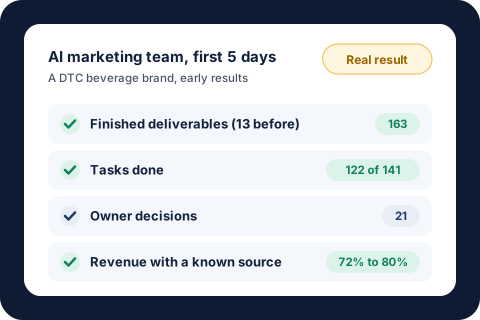
- In its first five days, a marketing team of AI employees for a DTC beverage brand finished 163 pieces of work, up from 13 the five days before, while the owners made 21 decisions.
What is an AI employee?
Most small businesses have more work than people. The owner, or one key person, ends up doing the follow-ups, the reports, and the "I'll get to it tonight" jobs. Hiring isn't always the fix, either. In the NFIB's April 2026 jobs report, 34% of small business owners had openings they couldn't fill.
An AI employee is a way to cover that repeatable work without another hire. It isn't a chatbot you have to remember to open. It's an AI with one job, set up the way you'd set up a new person on your team:
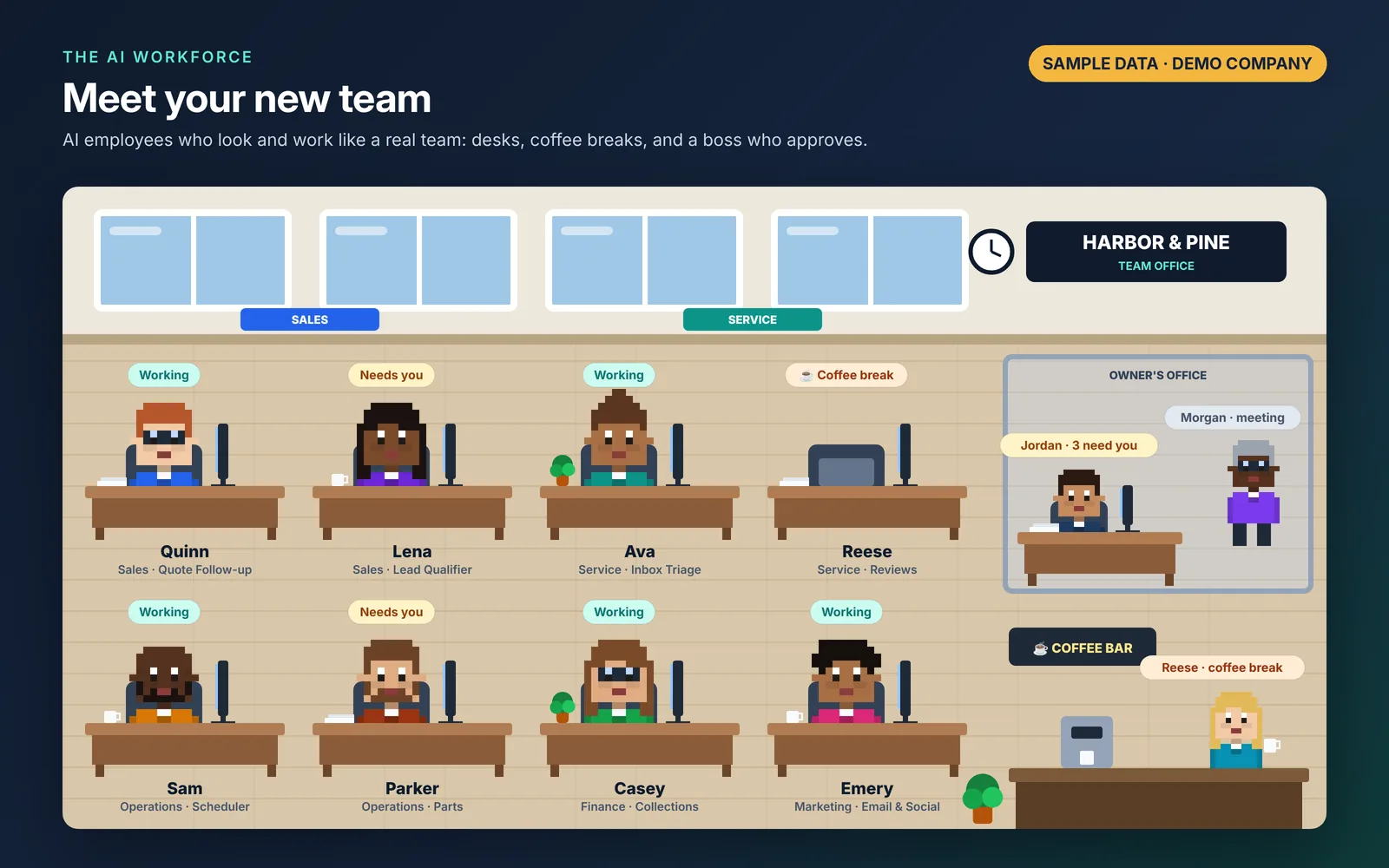
- A desk. Its own spot in a shared office you open in a browser or on your phone, showing whether it's working, needs you, or is free.
- A job description. Its purpose, what it owns, how it's measured, who it works with, what is not its job, and the rules it must follow. Change the job description and you change how it works.
- A task list. The work you've handed it, plus the work it proposes on its own.
- Access to your tools. It works inside the systems its job needs, such as your inbox, calendar, CRM, store, accounting, or spreadsheets. Logins stay in your own accounts.
- A scorecard. What it delivered (sales, meetings booked, tickets closed, invoices collected, hours saved), what it costs to run, and its return per $1.
Put several of these together and you have a team for a department. Put teams in several departments and you have what we call the AI Workforce, a done-for-you team of AI employees that KeyProcess Automation Services builds and runs for your business.
How do you give an AI employee work?
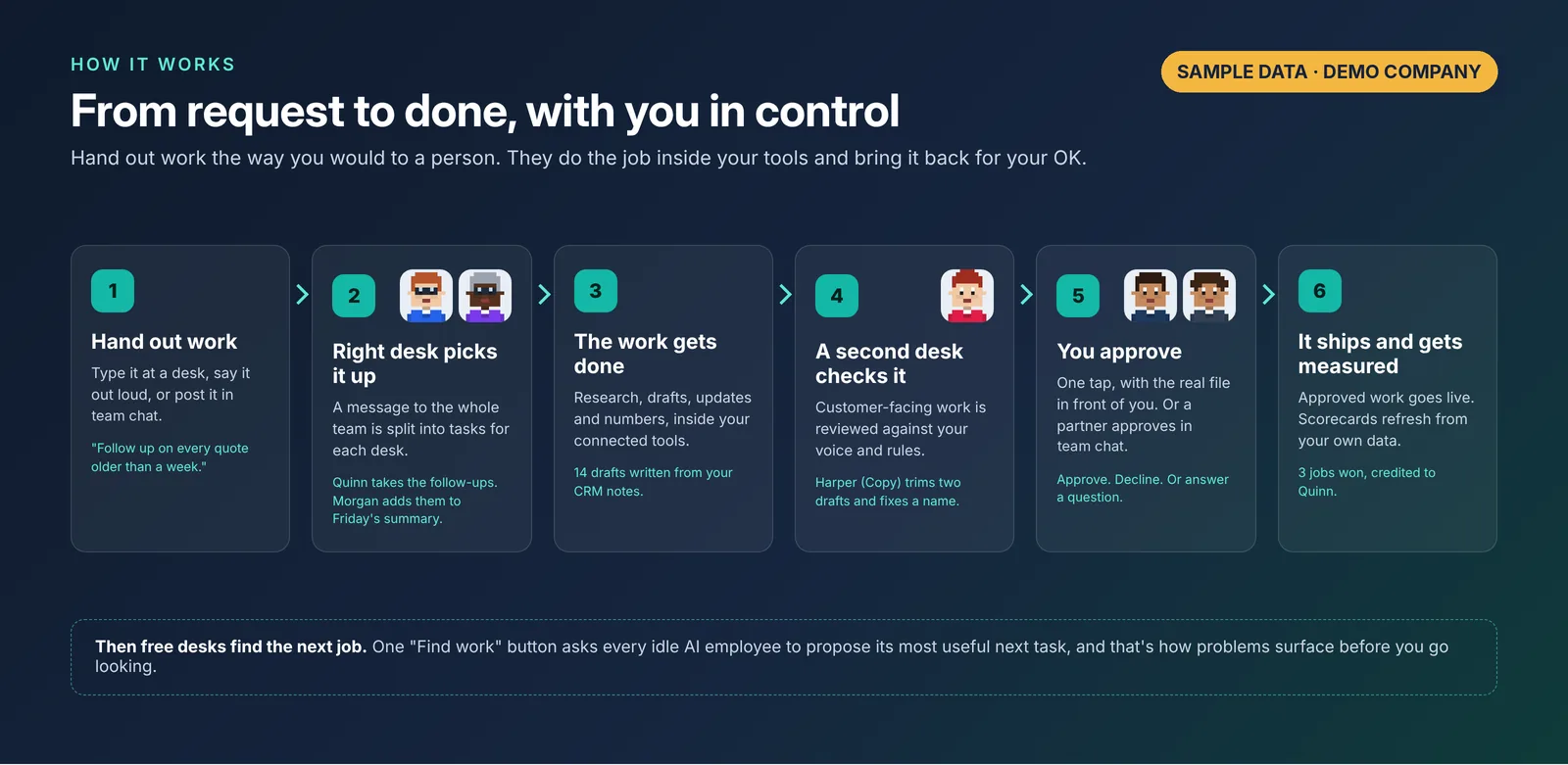
The same way you'd give it to a person. Type it at their desk, say it out loud, or post it in your team chat. A message to the whole team gets split into tasks for each desk that should act on it.
From there, the desk does the research, writes the draft, updates the system, or runs the numbers. A second desk checks anything customer-facing against your voice and your rules. Then the finished work lands on one "Needs you" list with Approve and Decline buttons and the actual file shown right there. You tap once. Approved work goes live, and the scorecards update from your own data several times a day.
One more thing makes this different from a tool you have to drive: a "Find work" button that asks every idle desk to propose the most useful next job in its area. That's where a lot of the value shows up, because desks find problems nobody asked them to look for.
What does an AI employee do in sales?
Sales is mostly follow-through: researching leads, following up on time, and writing proposals. That's exactly the work that slips when the person who closes deals is also running the business.
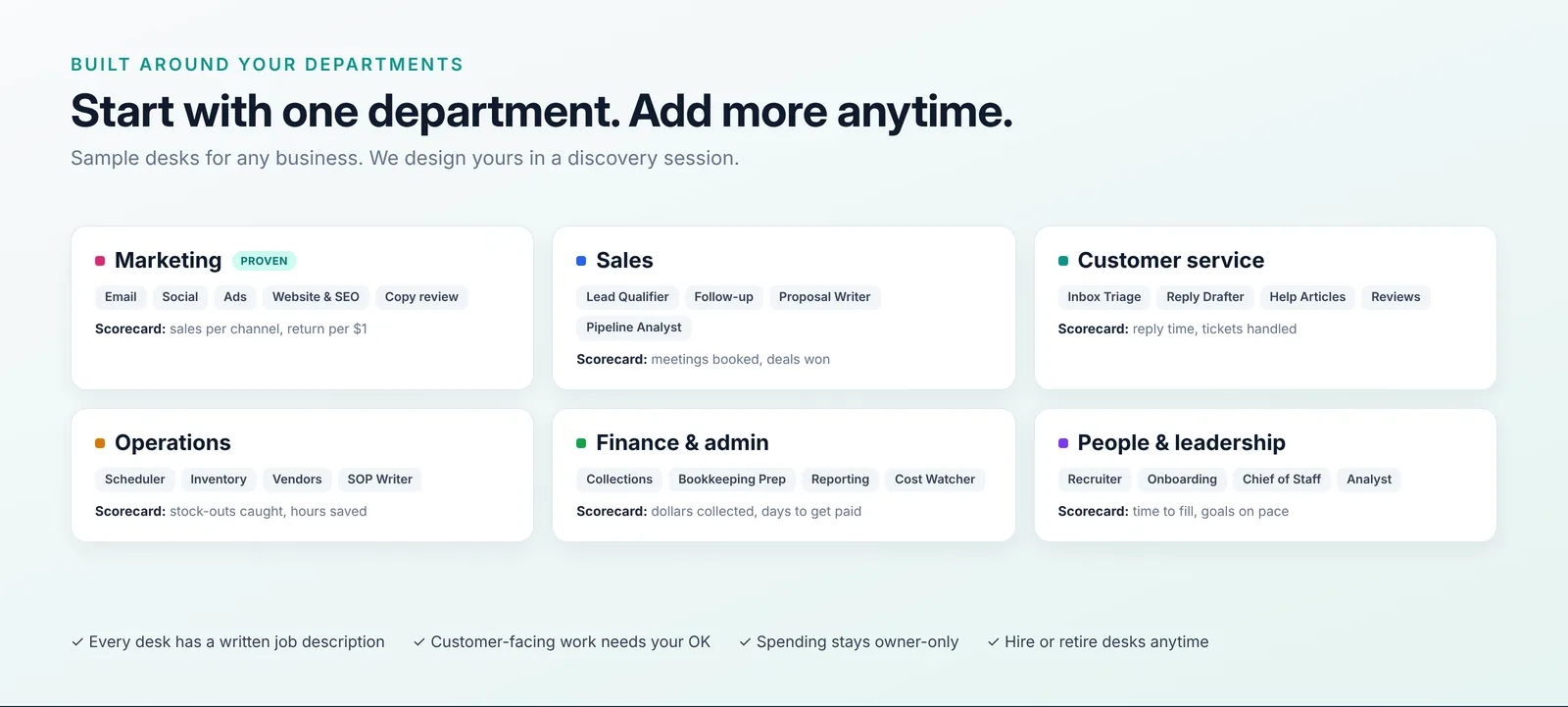
- Lead Qualifier: researches new leads and sorts them so you spend your time on the ones most likely to buy.
- Follow-up Manager: drafts the follow-ups that would otherwise wait until Friday, and flags deals that have stalled.
- Proposal Writer: builds a first draft of each proposal for you to review and send.
Scorecard: meetings booked and deals won. Every follow-up still goes out only after a person approves it.
What does an AI employee do in customer service?
Customer service is where the same questions arrive every day and the inbox never quite empties. AI employees can do the sorting and the first draft so your people spend their time on the conversations that need a person.
- Inbox Triage: sorts incoming tickets by type and urgency so nothing urgent sits under a pile of routine questions.
- Reply Drafter: writes replies in your voice for a person to approve.
- Knowledge Base Writer: turns repeat questions into help articles, so fewer of them come in next month.
Scorecard: reply time and tickets handled.
What does an AI employee do in operations?
Operations work is the glue: written procedures, stock levels, vendor follow-ups, and schedules. It rarely gets done well because it's never the most urgent thing on anyone's list.
- Process Manager: writes and updates the step-by-step procedures your team relies on.
- Inventory Watcher: raises stock alerts before something runs out.
- Scheduler: builds schedules and handles vendor follow-ups.
Scorecard: stock-outs caught and hours saved.
What does an AI employee do in finance and admin?
Finance and admin work follows clear rules, which makes it a good fit, as long as people keep the final say on money.
- Bookkeeping Prep: categorizes transactions for your bookkeeper or accountant to review.
- Collections: drafts reminders for late invoices, so you're not the one chasing them. Our guide to payment reminder schedules and wording shows what a good sequence looks like.
- Reporting: prepares the monthly reports you'd otherwise build by hand.
Scorecard: dollars collected and days to get paid. Financial decisions stay with people.
What does an AI employee do in HR and recruiting?
Hiring takes a lot of writing and organizing before anyone ever meets a candidate. AI employees can take that part.
- Recruiter: drafts job posts and screens applications so a person can decide who moves forward.
- Onboarding Coordinator: builds onboarding checklists so a new hire's first weeks don't depend on someone's memory.
Scorecard: time to fill. Hiring and firing decisions are always made by people.
Many owners also add a leadership desk, such as a Chief of Staff that writes a weekly business summary and tracks whether goals are on pace.
What does an AI employee do in marketing? A real example
Marketing is where we proved the AI Workforce first. The client was a small direct-to-consumer beverage brand with three product lines, including a seasonal gift product and an online shop, two websites, an email list of about 5,000, paid ads, and daily social posts. Two co-owners ran it, with no marketing staff. One owner handled all of the marketing.
We built a marketing office of 13 AI desks plus two owner desks, covering email, social, ads, website and SEO, creative, copywriting, one lead for each product line, retention, sales tracking, and a general manager. We connected 16 of the business's systems, and the scorecards came from the store's own order data.
What happened in the first five days
| 5 days before | First 5 days with the team | |
|---|---|---|
| Finished deliverables | 13 | 163 |
| Desk tasks | One at a time | 141 handed out, 122 done |
| Owners' role | Doing the work | Deciding: 21 decisions |
Those deliverables included a new homepage design, an About page, a reviews page, three gift blog posts, a weekly email, a holiday gift email, a win-back email, a welcome series, and daily partner posts on social media.
What the scorecards changed
Every dollar of marketing spend now shows what it brings back. The brand's own website and search bring back $22 for every $1 they cost, the best of any channel (counting only the fully tracked period, October 1 to November 13). Year to date, email brings back $14.44 for every $1 spent, and search ads bring back $2.35. The ads desk found most of the search spend was paying for clicks on the brand's own name, so that budget was cut and moved to the ads that sold the gift product.
The share of revenue with a known source went from 72% to 80%, so fewer sales land in the "unknown" pile. And links on the brand's own website and blog, which had brought in $0 a month, brought in $3,081 in 13 days.
What happened to sales
November sales are up 84% on last year, alongside the team's first weeks of work. We don't claim the team caused all of that: it's early, and it's peak gift season. But the owners can now see which work and which channels the sales are coming from.
What the desks found without being asked
- The weekly shop email had no tracking tags, so its sales showed up as "unknown."
- Almost 90% of last year's gift orders came in December, so gift emails and ads now run through December 24 instead of stopping mid-month.
- The pile of orders with an unknown source was split into seven named causes, each with a fix.
The honest caveat. These numbers come from the team's first five days, during peak gift season. We claim speed, clarity, and better decisions. Treat the sales lift as happening alongside the team, not proven to be caused by it, and judge revenue impact over at least a month. Channel credit for the part of the year before the store's order tracking started is an estimate built from analytics.
Will an AI employee do things you didn't approve?
No. It's the first question every owner asks, so these rules are built in from day one:
- Nothing customer-facing goes out without approval. That covers emails, social posts, ads, promotions, and public website copy.
- Spending is owner-only. No desk changes a budget, and only the named owner can approve a change in spend.
- Approval comes only from named people. A casual "sounds cool" counts as input, not a yes. An owner can give a partner or manager authority to approve certain work, and everything they approve is listed for the owner to review.
- Backups before every change, so any page or site edit can be rolled back.
- Your business rules are written into each desk, such as never inventing reviews or customer quotes.
- Declined stays declined. When you say no, desks don't quietly bring it back.
- People decisions stay human. Hiring, firing, medical, legal, and financial calls are made by people.
- Private data stays private. Scorecards show order numbers and totals, never customer names, emails, or addresses.
For more on where AI earns its place in a workflow (and where it doesn't), see our AI automation page.
How do you get started with AI employees?
Start with one department, usually the one where the owner is doing the most work by hand. Setup takes about four weeks:
- Week 1, discovery and connections. A working session on your goals, departments, tools, and the jobs that eat your time. We connect the tools the desks will use and agree on who approves what.
- Week 2, build the office. We set up each desk with a name, job description, tools, and rules, plus the scorecards.
- Weeks 3 and 4, pilot. Each desk gets real tasks. You approve, decline, and give feedback, and we tune the desks as we go. You finish with a before-and-after report on work shipped, decisions made, and what the scorecards showed.
Desks aren't fixed. In the first build, we hired three new desks and retired one in the first week as needs changed. You can start with one area (Starter, 2 to 3 AI team members), grow to a full department (Team), or go to several departments (Office). See AI Workforce pricing.
What does an AI Workforce cost?
There are two parts: a one-time setup fee, then a monthly plan.
| Setup (one time) | What you get | Price |
|---|---|---|
| Starter | One area, 2 to 3 AI team members | $2,500 |
| Team | A full department | $5,000 |
| Office | Several departments, managed from one office | From $10,000 |
Every setup includes building the office, training for you and your team, and 30 days of support. After that, a monthly Care plan keeps your team running and improving: monitoring, fixes, updates as your tools change, and a monthly review of what to improve next. Care scales with your plan, with a 3-month minimum: $500 a month for Starter, $1,000 for Team, and from $2,000 for Office.
You pay your own AI and software plans directly, so your accounts and your data stay yours.
Founding offer. Our first 5 AI Workforce clients get 25% off setup in exchange for letting us share their results (anonymously, if you prefer). That makes Starter $1,875, Team $3,750, and Office from $7,500. See the details in the AI Workforce pricing section.
Not sure which department to start with? Our guide to business processes to automate has a five-question scorecard for ranking your repetitive work, and the savings calculator shows what those hours are worth. You can see the full offer on the AI Workforce page.
About the author. Tyler founded KeyProcess Automation Services and has built dozens of automations, small and large, for property management, e-commerce, and marketing teams. You can see what they changed on our results page.
FAQ
Common questions about AI employees
What is an AI employee?
An AI employee is an AI assigned to one job in your business, with a written job description, a task list, access to the tools that job needs, and a scorecard showing what it delivered and what it costs. It works like a team member you hand work to, and a named person approves anything that reaches a customer or spends money.
What can AI employees do for a small business?
AI employees take repeatable work in each department: researching leads and drafting follow-ups in sales, sorting tickets and drafting replies in customer service, stock alerts and procedures in operations, late-invoice reminders and monthly reports in finance, and job posts and onboarding checklists in HR. In marketing they plan and produce campaigns, posts, emails, and pages.
Will an AI employee send or spend anything without my approval?
No. Nothing customer-facing goes out and no money is spent without a clear yes from a named person. Ad spend is owner-only, every site change is backed up first, and anything you decline stays declined.
Do AI employees replace my staff?
They take the repeatable work off your team's plate so people can spend their time on customers, sales, and decisions. Hiring, firing, medical, legal, and financial decisions always stay with people.
How much does an AI Workforce cost?
Setup is a one-time fee: Starter (one area, 2 to 3 AI team members) is $2,500, Team (a full department) is $5,000, and Office (several departments) starts at $10,000, including training and 30 days of support. After that, a monthly Care plan that scales with your plan, with a 3-month minimum: $500 a month for Starter, $1,000 for Team, and from $2,000 for Office. The first 5 clients get 25% off setup for sharing their results.
How long does it take to set up an AI Workforce?
About four weeks for the first department: one week for discovery and connecting your tools, one week to build the desks and scorecards, and a two-week pilot that ends with a before-and-after report.
Which departments can have AI employees?
Any department with repeatable work, including sales, customer service, operations, finance and admin, HR and recruiting, marketing, and leadership. Most businesses start with one department and add more.
See which AI employees your business would get first
Book a free one-hour walkthrough. We'll show you an AI office at work, with a demo company's data, then sketch which desks your departments would get first, whether you hire us or not.
Book your free one-hour walkthroughOr see the full offer on the AI Workforce page, or email tyler@keyprocessautomation.com