 KeyProcess Automation Services
Blog · What to automate
Automated payment reminders: the schedule and wording that get you paid on time
A ready-to-use reminder schedule, wording for every stage, which parts to automate and which to keep personal, and what it's worth to stop chasing invoices by hand.
The short answer: automated payment reminders are messages that go out on a set schedule before and after an invoice is due, and stop on their own once it's paid. A good schedule sends a heads-up a few days before the due date, one on the day, and firmer notes at 3, 7, and 14 days late. A person takes over after that.
Key takeaways
- Most late payments aren't refusals. They're forgotten, buried, or waiting on a question. A reminder on time fixes most of them.
- Use a fixed schedule: 3 days before, the due date, then 3, 7, and 14 days late. After 30 days, a person calls.
- Automate the routine reminders. Keep disputes, big accounts, and final notices personal.
- Every reminder should stop the moment a payment arrives, and every reply should reach a real person.
- For many small businesses, payment reminders are the quickest automation to pay for itself.
What are automated payment reminders?
Automated payment reminders are polite, pre-written messages that go to a customer on a schedule tied to their invoice's due date, without anyone on your team having to remember to send them.
They usually go by email, and sometimes by text. Each one includes the amount, the due date, the invoice number, and an easy way to pay. When the payment comes in, the reminders stop. When a customer replies with a question, the reply goes to a person on your team, not into a void.
That's the whole idea. Nothing about it is clever. It just does the same right thing, on the right day, every time. That's exactly what a busy office can't manage when invoice chasing is squeezed between everything else.
Do automated payment reminders actually work?
Yes, because most late payments are forgotten, not refused. An invoice gets buried in an inbox, the person who approves payments is out, or the customer has a quick question and never asks it. A clear reminder on time clears up most of these without anyone having an awkward conversation.
Late payment is a common problem. In the Federal Reserve's 2023 Small Business Credit Survey, 28% of small employer firms said they collect payment after delivering the product or service. The Fed's 2024 Report on Payments (the most recent payments report in the series) found that slow-paying customers are a common challenge for exactly those firms. If you send invoices and wait to be paid, you're in that group.
The real advantage of automation isn't a magic message. It's consistency. When reminders depend on someone remembering, they go out late, or only to the customers someone thought of, or not at all during a busy month. When they run on their own, every overdue invoice gets the same follow-up, every time.
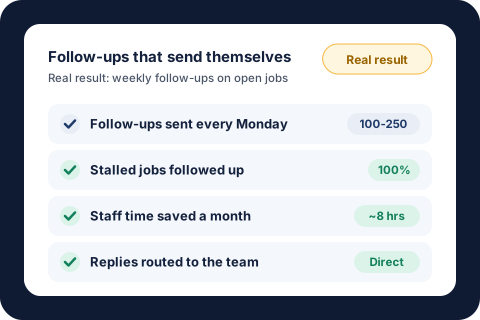
We've seen this in our own work. For one property management team, every vendor with a work order open two weeks or more now gets a personal status request every Monday. That's 100 to 250 follow-ups a week, and 100% of stalled jobs get chased. It saves the team about 8 hours a month, and replies come straight back to the right person. The work order follow-up case study covers it, and the same idea works for any open job, request, or unpaid invoice that needs chasing.
What is the best payment reminder schedule?
The best schedule starts gently before the due date and gets firmer each week after it. Here's the one we suggest as a starting point for most small businesses:
| When | Tone | Goal |
|---|---|---|
| When the invoice is sent | Thank-you | Confirm the amount, due date, and how to pay |
| 3 days before the due date | Friendly heads-up | Catch it before it's late |
| On the due date | Friendly | "Due today," with a one-click way to pay |
| 3 days late | Polite nudge | Assume it was missed, and ask if anything is holding it up |
| 7 days late | Clear and direct | State the overdue amount and ask for a payment date |
| 14 days late | Firm | Mention your payment terms and any late fee in your agreement |
| 30 days late | Personal | A person on your team calls or writes directly |
Adjust it to your terms. If you invoice net 30, the same pattern works. If most customers pay at the time of service, you may only need the late-stage reminders. For repeat customers who always pay on time, you can skip the pre-due reminder so you don't annoy them.
One rule matters more than the exact days: stop the moment the invoice is paid. A "your invoice is overdue" email that arrives the day after someone paid does more damage than no reminder at all.
What should a payment reminder say?
A good reminder is short, specific, and easy to act on. Every one should include the invoice number, the amount, the due date, and a direct way to pay. Here's wording you can adapt for each stage.
Before the due date
Subject: Invoice 1042 is due Friday
Hi Dana, just a heads-up that invoice 1042 for $1,250 is due this Friday, March 14. You can pay here: [link]. Thanks again for your business.
On the due date
Subject: Invoice 1042 is due today
Hi Dana, invoice 1042 for $1,250 is due today. If it's already on its way, thank you, and please ignore this note. Otherwise, you can pay in a minute here: [link].
A few days late
Subject: Checking in on invoice 1042
Hi Dana, our records show invoice 1042 for $1,250 is now 3 days past due. Is anything holding it up, like a question about the work or a missing detail? Just reply here and we'll sort it out. Pay here: [link].
Two weeks late
Subject: Invoice 1042 is 14 days past due
Hi Dana, invoice 1042 for $1,250 is now 14 days past due. Under our payment terms, a late fee of [amount] applies after [date]. Please pay here: [link], or reply with a date we can expect payment.
A few rules that make these work better:
- Lead with the facts. Put the invoice number and amount in the subject line so it's easy to find and forward.
- Make paying the easiest option. A pay link in every message beats "please remit at your earliest convenience."
- Give them a way out of embarrassment. "If it's already on its way, thank you" keeps things friendly with good customers who simply forgot.
- Only mention late fees you actually charge. If your contract doesn't include one, don't threaten one. This isn't legal advice, so check your agreements before you add fees.
- Send it from a real person's name. Replies come back to someone who can answer, and customers respond better to a name than to "Accounts."
Which reminders should stay personal?
Automate the routine reminders and keep a person on anything where a relationship or real money is at stake. In our view, owners get the most from automation when they're clear about where it stops.
Keep these personal:
- Disputes. If a customer replies "the job isn't finished" or "this amount is wrong," the reminders for that invoice should pause until someone answers.
- Your biggest accounts. A customer who makes up a large share of your revenue deserves a call, not a 14-day-late template.
- Anything past 30 days. At that point a conversation works better than another email.
- Final notices. Anything that mentions collections, stopping work, or legal steps should be written and sent by a person.
Everything else, which is usually the large majority of invoices, can run on its own. The win is that your team only spends time on the few invoices that need judgment, and never on the dozens that just needed a nudge.
What mistakes make reminders backfire?
Most problems come from reminders that don't know what's already happened. Watch for these:
- Reminding someone who already paid. The fastest way to irritate a good customer. Reminders must check that the invoice is still open before each one goes out.
- Replies that go nowhere. If a customer answers a reminder and nobody sees it, you've turned a quick question into a lost payment.
- Too many, too fast. Daily reminders feel like harassment. Weekly, with the tone getting firmer, works better.
- Vague messages. "You have an outstanding balance" with no invoice number or amount makes the customer do detective work, so they put it off.
- No one watching the overdue list. Even with reminders running, someone should see a short list of what's still unpaid each week. One of our bookkeeping automations sends a single noon email that flags only what needs a closer look, and that's the right pattern: the routine runs on its own, and a person sees the exceptions.
What is automating payment reminders worth?
Automating payment reminders pays off in two ways: the hours your team stops spending on chasing, and the money that arrives sooner.
An example, with made-up numbers. Say your office sends 80 invoices a month, about a quarter of them go past due, and each overdue invoice takes 20 minutes of checking, writing, and re-sending across its reminders. That's 20 overdue invoices × 20 minutes, or about 6.7 hours a month.
The median pay for general office clerks was $21.64 an hour in May 2025, according to the Bureau of Labor Statistics. Benefits made up about 30% of private employers' compensation costs in June 2026, also per the BLS, which puts that person's real cost at about $31 an hour. So the time alone is worth about $207 a month, or roughly $2,500 a year.
That's before counting the cash that shows up a week or two sooner, the late fees you actually collect, and the invoices that would otherwise have slipped through the cracks entirely. Those are harder to put a number on, but for many businesses they're worth more than the time.
A single automated process with KeyProcess Automation Services starts at $1,000, so in this example the time savings alone would cover it in about five months. If reminders are part of a bigger cleanup, such as invoices, bill checking, and order logging together, a package of 3 to 5 connected automations starts at $3,000. Our guide to calculating automation ROI walks through the full method, and the savings calculator runs the math with your own numbers.
How do you get started?
Before anything is automated, get these five things clear. They make reminders work whether you set them up yourself or have someone build them for you:
- Write down your payment terms. When is payment due, is there a late fee, and when does it apply?
- Pick your schedule. Start with the one in the table above and adjust the days to your terms.
- Write your messages once. Use the wording above as a draft, in your own voice.
- Decide who handles replies and exceptions. Name one person who answers questions, handles disputes, and makes the 30-day calls.
- Decide who sees the weekly overdue list. Even five minutes a week reviewing what's still open keeps nothing hidden.
From there, the goal is simple: reminders go out on their own, stop when the invoice is paid, and only the stubborn few reach a person. If you'd rather not build it yourself, that's exactly the kind of process we take off your plate. We build it around the tools you already use, so your team doesn't have to learn anything new, and we keep it running. For more ideas in the same vein, see our list of business processes to automate. If you're a contractor or run a property management office, our pages on home services automation and property management bookkeeping automation cover the follow-ups that matter most in those businesses.
About the author. Tyler founded KeyProcess Automation Services and has built dozens of automations, small and large, for property management and e-commerce teams. You can see what they changed on our results page.
FAQ
Common questions about automated payment reminders
How do automated payment reminders work?
They send pre-written messages on a schedule tied to each invoice's due date, such as a few days before, on the day, and at set points after. Each message includes the amount and a way to pay, the reminders stop once the invoice is paid, and replies go to a person on your team.
How often should you send payment reminders?
A good starting schedule is 3 days before the due date, on the due date, and then 3, 7, and 14 days late. After about 30 days, a person should call or write directly instead of sending another automated message.
Are automated payment reminders rude?
Not when they're short, specific, and friendly. Most customers who pay late simply forgot, so a clear note with the amount and a pay link is a help. A line like "if it's already on its way, thank you" keeps the tone warm.
What should a payment reminder email include?
The invoice number, the amount, the due date, a direct link or instructions to pay, and the name of a real person to reply to. Later reminders can also mention your payment terms and any late fee your agreement includes.
Which payment reminders should not be automated?
Disputes, your largest accounts, invoices more than about 30 days late, and any final notice that mentions collections or stopping work. Those need a person's judgment, so reminders for that invoice should pause and hand off.
How much does it cost to automate payment reminders?
With KeyProcess Automation Services, a single automated process starts at $1,000, and a package of 3 to 5 connected automations starts at $3,000. Every project starts with a free audit and a fixed quote, so you know the price before any work begins.
Stop chasing invoices by hand
Book a free 30-minute audit. We'll look at how your team follows up on unpaid invoices today and show you what it would take to have reminders go out on their own, with a fixed quote before any work starts. If it doesn't save your team time in the first 30 days, we fix it free until it does.
Request your free auditOr email tyler@keyprocessautomation.com