 KeyProcess Automation Services
Blog · Costs and payback
How much does it cost to hire an employee? The true cost, and when automation costs less
What a new hire really costs once you add payroll taxes, benefits, recruiting, and ramp-up time, how to work out your own number, and how to tell when automating the work is the cheaper answer.
The short answer: an employee usually costs about 1.4 times their wage once you add payroll taxes and benefits, before recruiting and training. A full-time administrative assistant at the national median wage of $48,310 costs about $69,000 a year. When most of the job would be repetitive work, automating that part often costs far less.
Key takeaways
- Benefits and payroll taxes were 30% of what private employers spent on each worker in June 2026, so a wage is only about 70% of the real cost.
- Recruiting, onboarding, ramp-up time, equipment, and your own management time add more, and most owners never count them.
- Before you hire, split the job into repeatable work and judgment work. Automation handles the first kind. People are better at the second.
- If the repeatable part is most of the job, automating it can cost a fraction of a salary. If it isn't, hire the person and let automation support them.
How much does it cost to hire an employee?
More than the wage. As a rule of thumb, plan on about 1.4 times what you pay the person, and more in the first year.
Here's where that number comes from. In June 2026, private employers spent an average of $46.89 per hour worked on each employee, according to the U.S. Bureau of Labor Statistics. Of that, $32.82 was wages and $14.07, or 30%, was benefits. Those benefits include paid leave, insurance, retirement, and the payroll taxes the law requires. Put another way, every dollar of wages came with about 43 cents more on top.
Apply that to a common small business hire. The median wage for secretaries and administrative assistants was $48,310 a year, or $23.23 an hour, in May 2025, per the BLS. If benefits are the same 30% share of the total, that person costs about $69,000 a year, or about $33 for every hour they work. That's before you spend anything to find them, train them, or give them a desk.
Your number will be different. A small business that offers fewer benefits will pay less on top of the wage, and one that offers strong health coverage may pay more. But the point holds for almost everyone: the salary on the job post is not what the hire costs.
What goes into the true cost of an employee?
The full cost of a hire has three layers: what you pay every pay period, what it takes to bring someone on, and the costs that come with having another person on the team.
What you pay every pay period
- Wages. The salary or hourly pay, plus any overtime and bonuses.
- Payroll taxes. As the employer, you pay 6.2% for Social Security and 1.45% for Medicare on each employee's wages, per the IRS. That's 7.65% before anything else. On a $48,310 salary, it comes to about $3,696 a year.
- Unemployment taxes. Federal unemployment tax is 6.0% on the first $7,000 of each employee's wages, but most employers get a credit of up to 5.4% for paying state unemployment tax, which brings it down to 0.6%, or $42 a person, according to the IRS. State unemployment tax is separate, and the rate depends on your state and history.
- Workers' compensation. Required in most states, priced by your state, industry, and the kind of work.
- Benefits. Health insurance, paid time off, holidays, retirement contributions, and anything else you offer to compete for good people.
What it takes to bring someone on
- Recruiting. Job ads, background checks, and, most of all, the hours you and your team spend writing the post, reading resumes, and interviewing.
- Onboarding and training. Paperwork, setting up accounts, and the time a coworker spends showing the new person how things work.
- Equipment and software. A computer, a phone, and a paid seat in every system they'll use.
What comes with another person on the team
- Ramp-up time. A new hire is paid in full from day one but takes weeks or months to work at full speed.
- Management time. Every person you add needs check-ins, reviews, coverage when they're out, and answers to their questions.
- Turnover. If they leave, you pay most of the hiring costs again, and the work piles up while the seat is empty.
How do you calculate the cost of hiring an employee?
Add the yearly costs, then the one-time costs, and divide by the hours the person will actually work. Here's a simple version you can fill in:
- Start with the yearly wage. Use the pay you'd actually offer, not the low end of the range.
- Add taxes and benefits. If you don't know yours, multiply the wage by 1.43, which matches the BLS average where benefits are 30% of total cost. If you know your real benefit costs, use those instead.
- Add one-time costs. Job ads, background checks, equipment, and software seats for the first year.
- Add the time cost. Estimate the hours you and your team spend hiring and training, and multiply by what an hour of your time is worth.
- Divide by working hours. A full-time year is about 2,080 hours, but paid time off and holidays mean fewer hours of real work. The result is your true cost per working hour.
An example, with made-up numbers. You're hiring an office assistant at $48,000 a year. Taxes and benefits bring that to about $68,600. You spend $600 on job ads and checks and $1,500 on a computer and software. You and a manager spend 40 hours hiring and training, at $50 an hour, which adds $2,000. The first year costs about $72,700. If the person works 1,900 hours after time off, every working hour costs you about $38.
That hourly figure is the one to compare against anything else, including automation. Our guide to calculating automation ROI uses the same idea from the other side.
What hidden costs do owners miss?
The costs that never show up on a payroll report are often the biggest ones.
- The empty seat. While you search, someone else covers the work, usually you. In the NFIB's April 2026 jobs report, 34% of small business owners had job openings they couldn't fill, and 46% got few or no qualified applicants. A search can take a long time.
- The learning curve. For the first few months, you pay a full wage for part of the output, and someone else's time goes into training.
- Mistakes in busy weeks. When follow-ups and paperwork depend on a person remembering, the busiest weeks are when things slip. That's true of every hire, not just a new one.
- Growth. If the work keeps growing, one hire often turns into two. As the business grows, the rules-based work grows with it, and so does the cost of doing it by hand.
When is automation cheaper than hiring?
When the job you're hiring for is mostly repeatable work: work that happens on a schedule, follows the same steps, and moves information from one place to another. Think data entry, follow-up emails, reminders, building the same report every week, filling in paperwork from details you already have, and checking one list against another.
That kind of work is often a big share of an admin job, and it's exactly what automation does well. Here's what it looked like in some of our real projects:
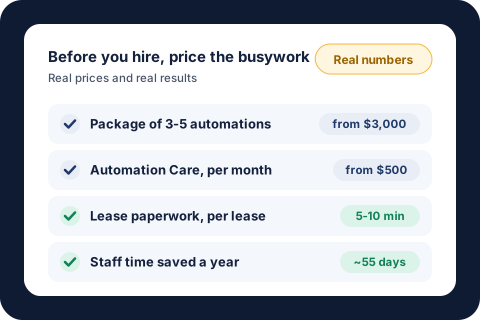
- Lease paperwork. For one property management team, the paperwork for each lease dropped from 1.5 to 2 hours to 5 to 10 minutes, across 300 to 400 leases a year. That's about 55 workdays of staff time saved each year (lease approval case study).
- Vendor follow-ups. Every vendor with a work order open two weeks or more gets a personal status request every Monday. That's 100 to 250 follow-ups a week and about 8 hours saved a month (work order case study).
- Bookkeeping checks. Recurring bills are matched and logged every day with zero data entry, saving about 8 hours of bookkeeping a month (water bill case study).
Compare the costs side by side. With KeyProcess Automation Services, a single automated process starts at $1,000, a package of 3 to 5 connected automations starts at $3,000, and Automation Care, which keeps everything monitored and fixed, starts at $500 a month. A package and a year of Care at those starting prices comes to $9,000 in the first year and $6,000 a year after that. A full-time admin at the median wage costs about $69,000 a year.
Those aren't the same thing, and it would be wrong to pretend they are. An automation won't answer the phone or calm down an upset customer. But if the reason you're hiring is that the team is buried in follow-ups and paperwork, automating that work first can make the hire unnecessary, or let you hire for a smaller role.
An example, with made-up numbers. Your team spends 25 hours a week on work you'd hand to a new admin. When you list it out, 15 of those hours are repeatable: invoices, reminders, a weekly report, and copying details between systems. At $33 an hour, those 15 hours cost about $25,700 a year. Automating them at the starting prices above costs $9,000 in the first year. The other 10 hours, the calls and judgment calls, stay with your team or a part-time hire. You can try the math with your own numbers in our savings calculator.
If you want an AI to handle work like drafting replies and sorting incoming requests, our AI Workforce page shows what that looks like.
When should you hire instead?
Hire a person when the work needs a person. Automation is the wrong answer when:
- The job is mostly judgment. Pricing a custom job, handling a complaint, or deciding who gets approved needs someone who can weigh the details.
- The job is mostly relationships. Sales, account management, and the client call about bad news should come from a person.
- The work is different every time. If there are no steady steps to follow, there's nothing to automate yet.
- You need hands on site. Repairs, deliveries, installs, and in-person service need people.
- The decision carries legal, medical, financial, or people risk. Automation can gather what's needed and prepare it, but a person should make the call.
Even then, the two work well together. Automation takes the copy-and-paste off a new hire's plate from day one, so they spend their time on the work you actually hired them for. That's usually the best outcome: a smaller, happier team that isn't buried in admin. Our guide to what business automation costs covers the trade-off in more detail.
How do you decide between hiring and automating?
Before you post the job, take an hour and do this:
- Write down the job. List every task the new person would do in a normal week, with rough hours.
- Mark each task. Is it repeatable and rules-based, or does it need judgment, relationships, or hands on site?
- Add up each side. If the repeatable side is most of the hours, automation is worth pricing before you hire.
- Price both options. Use the true cost of the hire from the steps above, and get a fixed quote for automating the repeatable work.
- Decide what's left. Is the remaining work a full-time job, a part-time one, or something your current team can absorb once the busywork is gone?
Our automation audit guide has a simple scorecard for step 2. Or let us do it with you: a free automation audit takes 30 minutes, and you leave with a written list of what to automate first and what it could save, whether you hire us or not. If an automation doesn't save your team time in the first 30 days, we fix it free until it does.
About the author. Tyler founded KeyProcess Automation Services and has built dozens of automations, small and large, for property management and e-commerce teams. You can see what they changed on our results page.
FAQ
Common questions about the cost of hiring an employee
How much does it cost to hire an employee?
Plan on about 1.4 times the wage once payroll taxes and benefits are added, based on BLS data showing benefits were 30% of private employers' compensation costs in June 2026. A full-time administrative assistant at the $48,310 median wage costs about $69,000 a year, before recruiting, training, and equipment.
What is the true cost of an employee?
The true cost includes wages, employer payroll taxes (7.65% for Social Security and Medicare, plus unemployment taxes), workers' compensation, benefits, recruiting, onboarding, equipment and software, ramp-up time, management time, and the cost of replacing someone who leaves.
How do you calculate the cost of hiring an employee?
Add the yearly wage, taxes, and benefits, then the one-time costs of recruiting, equipment, and training time. Divide the total by the hours the person will actually work after time off. That gives your true cost per working hour, which you can compare with other options.
Is automation cheaper than hiring an employee?
For repeatable, rules-based work, usually yes. With KeyProcess Automation Services, a package of 3 to 5 automations starts at $3,000 and Automation Care starts at $500 a month, compared with about $69,000 a year for a full-time admin. Work that needs judgment, relationships, or hands on site still needs a person.
Will automation replace my employees?
Usually not. It takes the copy-and-paste, reminders, and report building off your team's plate so they can spend their time on customers and decisions. For many small businesses, it means the next administrative hire can wait or become a smaller role.
What should I do before hiring an admin?
List every task the new person would do in a normal week, mark which ones are repeatable and which need judgment, and add up the hours on each side. If the repeatable work is most of the job, price automating it before you post the job.
Find out whether your next hire could be an automation
Book a free 30-minute audit. We'll look at the work you're thinking of hiring for, and you'll leave with a written list of what could be automated, what it would cost, and what it could save you, whether you hire us or not. We're taking only 3 new clients this quarter.
Request your free auditOr email tyler@keyprocessautomation.com