 KeyProcess Automation Services
Blog · Costs and payback
How to calculate automation ROI (and know if it's worth it before you spend a dollar)
The formula, a five-step method a busy owner can finish in ten minutes, worked examples, real results, and the costs most ROI math leaves out.
The short answer: to calculate automation ROI, take the yearly value of the time and mistakes it saves, subtract what the automation costs in a year, divide by that cost, and multiply by 100. For a quicker gut check, divide the upfront price by the monthly savings to see how many months it takes to pay for itself.
Key takeaways
- Automation ROI = (yearly value − yearly cost) ÷ yearly cost × 100. Payback in months = upfront cost ÷ monthly savings.
- Value an hour at what it really costs you, not just the wage. Benefits add about 30% on average.
- Count only the share of a task automation actually takes over. It's rarely 100%.
- A good first project pays for itself in months, not years. If payback is longer than a year, pick a different task.
- Ongoing care pays off best across several automations, not on one small one.
What is the automation ROI formula?
Automation ROI is the yearly value an automation creates, minus what it costs, as a percentage of the cost.
ROI (%) = (yearly value − yearly cost) ÷ yearly cost × 100
Two more numbers are worth working out, because owners usually care about them more than a percentage:
- Payback period (months) = upfront cost ÷ monthly savings. This is how long until the automation has paid for itself. After that, the savings are yours.
- Yearly net savings = yearly value − yearly cost. This is the actual dollars back in your pocket each year.
Most guides stop at the formula. The hard part is getting honest inputs, which is what the next section is for.
How do you calculate automation ROI, step by step?
Work it out one task at a time, in five steps. Use real numbers from your week, not hopes.
1. Time the task honestly
Write down how long the task takes each time and how often it happens. "Building the Monday report takes about 90 minutes" or "each new client takes 40 minutes of paperwork, about 12 a month." Include the small stuff people forget: finding the file, chasing a missing number, fixing a typo, and re-sending. If you aren't sure, time it for one week. Guesses are almost always too low.
2. Put a real dollar figure on an hour
Use what an hour really costs you, not just the hourly wage. Employers paid an average of $46.89 per hour worked for private industry workers in June 2026, according to the U.S. Bureau of Labor Statistics. Of that, $32.82 was wages and $14.07 (30%) was benefits.
Admin work usually pays less than that average. The median pay for general office clerks was $21.64 an hour in May 2025, per the Bureau of Labor Statistics. If benefits make up the same 30% share, that person costs you about $31 an hour. If the task lands on you, the owner, use a higher number. Your hour is worth what you could be doing with it instead.
3. Estimate how much of the task automation takes over
Automation rarely removes 100% of a task. Someone still glances at the report, approves the message, or handles the odd exception. A fair starting assumption is 70% to 90% of the time for a repetitive, rule-based task, and less for anything that needs judgment. When we quote a project, we tell you what will still need a person.
4. Add up every cost
Include the build price, any monthly upkeep, and a few hours of your own time for the audit, answering questions, and testing. With us, one automated process starts at $1,000, a package of 3 to 5 connected automations starts at $3,000, and Automation Care, which keeps everything monitored, fixed, and improved, starts at $500 a month. Our guide to what business automation costs explains what moves a price up or down.
5. Run the numbers
Weekly hours saved × your hourly cost × 52 = yearly value. Then plug that into the formulas above. If the answer is close, do the math again with more cautious inputs. A project that only works on optimistic numbers isn't a good first project.
A worked example
An example, with made-up numbers. An office manager spends 5 hours a week building a weekly client report, at about $31 an hour. Automation takes over 80% of it, so they get 4 hours a week back.
- Weekly value: 4 hours × $31 = $124 a week.
- Yearly value: $124 × 52 = $6,448.
- Cost: a $1,000 build.
- Payback: $1,000 ÷ $124 = about 8 weeks.
- First-year ROI: ($6,448 − $1,000) ÷ $1,000 × 100 = about 545%.
Now add $500 a month of ongoing care to that one small automation. The yearly cost becomes $7,000, and the first-year ROI drops to about −8%. That's why we don't recommend paying for care on a single small automation. Care makes sense once several automations are doing real work for you.
A second example, also with made-up numbers. A package of connected automations saves a team 15 hours a week at about $31 an hour. That's $465 a week, or $24,180 a year. With a $3,000 build and $500 a month of care, the first-year cost is $9,000 and the first-year ROI is about 169%. After care, it saves about $1,515 a month, so the build pays for itself in about 2 months.
Want to skip the arithmetic? Our savings calculator does it for you. Enter the hours, the hourly cost, and the share you'd automate.
What do real automation savings look like?
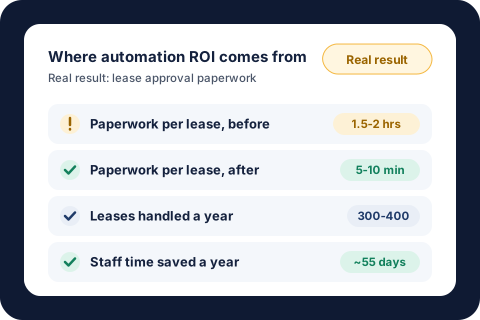
Here are three results from our own work, with rough dollar math using the $31-an-hour admin estimate above:
| Result | Time saved | Rough yearly value at $31/hour |
|---|---|---|
| Lease approval paperwork: 1.5 to 2 hours per lease down to 5 to 10 minutes, across 300 to 400 leases a year | About 55 workdays a year | About $13,640 |
| Stalled work orders followed up every Monday, 100 to 250 at a time | About 8 hours a month | About $2,976 |
| Utility bills reconciled every day with zero data entry | About 8 hours of bookkeeping a month | About $2,976 |
The time saved comes from real projects. The dollar values are our estimate, using 8-hour workdays and the hourly figure from step 2. Your own numbers will differ.
Notice the pattern. The biggest returns come from tasks that happen often, take a person real time each time, and follow the same rules every time. The lease approval paid off because it ran hundreds of times a year. If you're not sure which of your tasks fit that pattern, our list of business processes to automate is a good place to look.
What about the benefits that are hard to price?
Some of the best results don't show up as hours. Follow-ups stop slipping, bills get checked before they're late, and work keeps moving when a key person is out. Count these only when you can put an honest price on a miss: a late fee you stopped paying, a lead that used to go cold, or a vendor you used to chase. If you can't price it, leave it out of the ROI and treat it as a bonus. That way your numbers hold up.
What costs does ROI math usually miss?
- Your team's time during setup. Plan on a few hours for the audit, answering questions, and testing before anything goes live.
- New software fees. Some approaches mean paying for extra software every month. We build around the tools you already use, so most projects add nothing new, but always ask.
- Upkeep when things change. Software updates, a new form, or a changed report layout can break an automation. Someone has to notice and fix it. That's what ongoing care covers, or what you'll do yourself.
- The process changing under you. Automating a process you're about to redo means paying twice. Settle the process first.
- Review time that never goes away. If someone still checks every output, count that time against the savings.
Costs are worth watching closely right now. In the Federal Reserve's 2025 Small Business Credit Survey, 77% of employer firms said they faced challenges from rising costs in the prior 12 months (2026 Report on Employer Firms). Hiring and keeping qualified staff was among the most common operational challenges. When every hire costs more, getting hours back from the team you have is often the cheaper move. Our guide to the true cost of hiring an employee shows what a new hire really adds up to.
What is a good ROI for automation?
For a small business, judge by the payback period first. Here's the rule of thumb we use:
- Under 6 months: a strong first project. Do it.
- 6 to 12 months: worth doing if the task is also error-prone or slows other people down.
- Over 12 months: pick a different task first, unless there's a cost you can't put in the math, like a compliance deadline.
Automation usually doesn't pay off for tasks you do a few times a year, tasks that take a couple of minutes a week, work that needs judgment every single time, or a process that's still changing. A checklist is cheaper for those. If you're a U.S. business, some automation projects may also qualify for the federal R&D tax credit, which can lower the real cost. See our R&D tax credit guide and check with your CPA.
A worksheet for your own numbers
Fill in one row per task you're considering. The one with the shortest payback is usually the best place to start.
| Question | Your answer |
|---|---|
| How long does the task take each time, including chasing and fixing? | ____ minutes |
| How many times a week does it happen? | ____ |
| Hours a week (minutes × times ÷ 60) | ____ |
| Share automation could take over (start at 70% to 90%) | ____ % |
| What an hour of that person's time really costs (wage ÷ 0.7 is a fair estimate) | $____ |
| Weekly value (hours × share × hourly cost) | $____ |
| Upfront cost, plus any monthly cost | $____ + $____ a month |
| Payback in weeks (upfront cost ÷ weekly value, after monthly costs) | ____ weeks |
If filling this in feels like guesswork, that's what our free audit is for. In 30 minutes, we walk through where your team's week goes and give you a written list of what to automate first, with the hours and payback for each, whether you hire us or not. Every project gets a fixed quote, and if an automation doesn't save your team time in the first 30 days, we fix it free until it does. If you're weighing whether to bring in help at all, our guide to what an automation consultant does covers what you should get.
About the author. Tyler founded KeyProcess Automation Services and has built dozens of automations, small and large, for property management and e-commerce teams. You can see what they changed on our results page.
FAQ
Common questions about automation ROI
How do you calculate ROI on automation?
Work out the yearly value of the time and mistakes the automation saves, subtract what it costs in a year, divide by that cost, and multiply by 100. Value time at what an hour really costs you, including benefits, and count only the share of the task automation actually takes over.
How long does it take for automation to pay for itself?
Divide the upfront cost by the monthly savings. A good first project for a small business usually pays for itself within a few months. If the math says more than a year, start with a different task.
What is a good ROI for business automation?
Judge by payback first. Under 6 months is a strong first project, 6 to 12 months is worth it if the task is also error-prone, and over 12 months usually means a different task should go first.
How do I value an hour of my team's time?
Start with the hourly wage and add benefits. Benefits made up about 30% of employer costs for private industry workers in June 2026, according to the Bureau of Labor Statistics, so dividing the wage by 0.7 gives a fair estimate.
Should I include ongoing maintenance in the ROI?
Yes. Include any monthly care or software fees in the yearly cost. Ongoing care usually pays off best when it covers several automations, not one small one.
Is automation ROI only about time saved?
No, but time saved is the part you can measure most reliably. Fewer missed follow-ups, avoided late fees, and work that keeps moving when someone is out are real benefits too. Count them only when you can put an honest price on a miss.
Find out what automation would pay back in your business
Book a free 30-minute audit. We'll size up the tasks eating your team's week and show you which ones pay for themselves fastest, with real numbers, before you spend anything.
Request your free auditOr email tyler@keyprocessautomation.com