 KeyProcess Automation Services
Blog · Hiring automation help
What is an automation audit? What a good one includes, and how to run your own
What you should walk away with, a sample of what the results look like, a free worksheet to audit your own week, the red flags to watch for, and what happens next.
The short answer: an automation audit is a review of how your team spends its week that finds the repetitive tasks worth automating, estimates the hours each one would give back, and ranks them. A good one ends with a written list of what to automate first, what it would cost, and what to leave alone.
Key takeaways
- An automation audit looks at your work, not your software. It finds the tasks that repeat, follow rules, and eat hours.
- You should leave with something in writing: a ranked list, hours back for each task, a rough cost, and what not to automate.
- You can run a basic version yourself with the worksheet below in under an hour.
- Red flags: no written output, no numbers, a push to buy new software, or advice to automate everything.
- A free audit is still worth it when it gives you a list you could act on without hiring anyone.
What is an automation audit?
An automation audit is a structured look at where your team's hours go, with one question in mind: which of these tasks could run on their own?
It usually starts with a conversation, not a software review. You describe your week: the follow-ups, the reports, the paperwork, the data that gets typed from one place into another. The person running the audit listens for work that repeats, follows the same rules every time, and costs real hours or real money when it slips.
It's sometimes called a business process audit or an automation assessment. The name matters less than the output. You should finish with a clear, ranked answer to "what should we automate first, and is it worth it?"
Why bother now? Costs are squeezing small businesses. In the Federal Reserve's 2025 Small Business Credit Survey, 77% of employer firms said they faced challenges from rising costs in the prior 12 months, according to the 2026 Report on Employer Firms. When hiring another person is hard to justify, getting hours back from the team you already have is the next best move, and an audit tells you where those hours are.
What should an automation audit include?
A good automation audit gives you six things, ideally in writing:
- A list of your repetitive tasks. Every task that happens weekly or more and follows the same steps, with who does it today.
- Hours for each one. An honest estimate of how long each task takes per week, including the chasing, fixing, and re-sending people forget to count.
- A ranking. Which task to automate first, second, and third, based on hours saved, how often it goes wrong, and how simple it is to hand off.
- A rough cost and payback. What automating the top tasks would cost and how many months until the time saved covers it.
- A "leave it alone" list. The tasks that need judgment, happen too rarely, or would cost more to automate than they save. A good audit tells you what not to do.
- Where a person stays involved. For each automation, which step still needs someone's approval, such as anything customer-facing or involving money.
It should not require you to buy new software, switch systems, or hand over passwords before you've even agreed to anything. And it should be about outcomes ("this gives your office manager back about 4 hours a week"), not jargon.
What do the results of an audit look like?
The results of an audit should fit on a page or two and be easy to act on. Here's the kind of ranked list you should get. This is an example with made-up numbers, for a fictional 12-person services business:
| Rank | Task | Hours a week today | Recommendation |
|---|---|---|---|
| 1 | Chasing unpaid invoices | 4 | Automate reminders; a person handles disputes |
| 2 | Weekly sales and job report | 3 | Automate fully; report arrives every Monday |
| 3 | New client paperwork | 3 | Automate drafts; a person reviews before sending |
| 4 | Following up on quotes | 2 | Automate the first two follow-ups |
| — | Handling complaints | 2 | Leave alone; needs a person every time |
Notice the last row. An audit that recommends automating everything isn't doing its job. Complaints, negotiations, and anything where a relationship is on the line should stay with a person.
Here's what the top of a list like that can turn into. In one of our real projects, approval letters, payment summaries, ready-to-sign leases, and the end-of-day report for a property management team now build themselves. The paperwork for each lease went from 1.5 to 2 hours down to 5 to 10 minutes, across 300 to 400 leases a year. That's about 55 workdays of staff time saved every year. The lease approval case study has the details, and the same idea works for quotes, contracts, and onboarding packets in any business.
How do you run your own automation audit?
You can run a basic automation audit yourself in under an hour. Here's the method we'd suggest.
1. Log one normal week
Ask everyone on the team to jot down the repetitive tasks they do, how often, and roughly how long each takes. Count the small stuff: finding the file, chasing a reply, and fixing a typo. A real week beats a memory.
2. Score each task
Give each task a score from 0 to 2 on four questions, then add them up:
| Question | 0 | 1 | 2 |
|---|---|---|---|
| How often does it happen? | Monthly or less | Weekly | Daily |
| How many hours a week does it take? | Under 1 | 1 to 3 | More than 3 |
| Does it follow the same steps every time? | Rarely | Mostly | Always |
| What does a miss cost? | Nothing much | Annoyance or rework | Lost money or customers |
Tasks scoring 6 or more are strong candidates. Anything that scores 0 on "same steps every time" goes on the leave-it-alone list, however many hours it takes. If you need ideas for what belongs on the list, our guide to business processes to automate covers 15 common ones.
3. Put a dollar figure on the top three
Multiply the weekly hours by what an hour really costs you. The median pay for general office clerks was $21.64 an hour in May 2025, per the Bureau of Labor Statistics, and benefits made up about 30% of private employers' compensation costs in June 2026, also per the BLS. Together that's about $31 an hour. If the task lands on you, the owner, use a higher number. Our guide to calculating automation ROI walks through the full math, and the savings calculator does it for you.
4. Decide where a person stays involved
For each top task, write down which step still needs someone: approving a payment, checking a document before it goes to a client, or answering a reply. This keeps the automation safe and makes the next conversation with any provider much faster.
What a do-it-yourself audit can't easily tell you is what each automation would cost to build, what it would take with the software you already have, and which hidden steps will cause trouble. That's where an outside audit earns its keep.
What are the red flags in an automation audit?
Most red flags come down to an audit that's really a sales pitch. Watch for these:
- Nothing in writing. If you leave with a good feeling and no list, you didn't get an audit.
- No numbers. "This will save you a lot of time" isn't an estimate. Ask for hours per task.
- A push to switch software. Most small businesses can automate around the tools they already use. Be wary if the first recommendation is a new subscription.
- "Automate everything." A good auditor tells you what isn't worth it. If nothing lands on the leave-it-alone list, they weren't really looking.
- No talk of what happens when something breaks. Automations need looking after. Ask who keeps them running, and what that costs.
- No clear answer on ownership. You should own your accounts and your data, whoever builds the automations.
For a wider look at choosing help, our guide to what an automation consultant does covers the questions to ask before you hire anyone.
Is a free automation audit worth it?
Yes, if you leave with a list you could act on without hiring the person who ran it. That's the test.
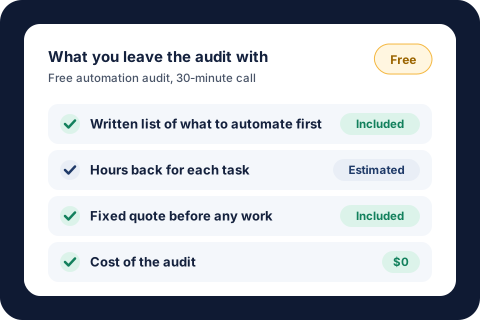
Let's be honest about the catch: a free audit is also how a provider meets potential clients. That's fine, as long as the audit stands on its own. Ours works like this. You fill out a short form (about 4 minutes) about your business, where your time goes, and the one task you'd hand off first. Then we have a 30-minute call. You leave with a written list of what to automate first and what it could save you, whether you hire us or not.
To get the most out of any audit, free or paid, bring three things: the task that annoys you most, a rough count of hours your team spends on repetitive admin each week, and a list of the software you already use. If you've done the worksheet above, bring that too. It turns a general conversation into a specific plan.
What happens after the audit?
After a good audit, you decide what to do with the list. You might fix a few things yourself, hand them to someone on your team, or get a quote.
If you work with us, every project gets a fixed quote before any work starts. A single automated process starts at $1,000, a package of 3 to 5 connected automations starts at $3,000, and Automation Care, which keeps everything monitored, fixed, and improved, starts at $500 a month. Our guide to what business automation costs explains what moves those numbers. If an automation doesn't save your team time in the first 30 days, we fix it free until it does. You own your accounts and your data either way.
We keep our client list small so every project gets real attention, and we're taking only 3 new clients this quarter. If you'd like to see what we've built before you book, the results page has 14 real examples.
About the author. Tyler founded KeyProcess Automation Services and has built dozens of automations, small and large, for property management and e-commerce teams. You can see what they changed on our results page.
FAQ
Common questions about automation audits
What is an automation audit?
An automation audit is a review of how your team spends its week that finds the repetitive tasks worth automating. It estimates the hours each one would give back, ranks them, and ends with a written list of what to automate first, what it would cost, and what to leave alone.
What does an automation audit include?
A good one includes a list of your repetitive tasks, hours for each, a ranking of what to automate first, a rough cost and payback, a list of tasks not worth automating, and where a person should stay involved. Ideally all of it is in writing.
How long does an automation audit take?
Ours takes about 4 minutes to fill out online and a 30-minute call. A do-it-yourself version takes about an hour, plus a week of jotting down where the team's time goes. Larger businesses with many teams may need longer.
Is a free automation audit really free?
Ours is. You leave with a written list of what to automate first and what it could save you, whether you hire us or not. Any free audit is also a way for a provider to meet clients, so judge it by whether the list is useful on its own.
Can I do an automation audit myself?
Yes. Log one normal week of repetitive tasks, score each on how often it happens, how long it takes, whether the steps are always the same, and what a miss costs, then put a dollar figure on the top three. An outside audit adds what each automation would cost and the hidden steps that cause trouble.
What should I bring to an automation audit?
Bring the task that annoys you most, a rough count of the hours your team spends on repetitive admin each week, and a list of the software you already use. A filled-in self-audit worksheet makes the conversation even more specific.
Get your free automation audit
Tell us how your team works today. In a 30-minute call, we'll find the tasks worth automating first and how much time they'd give back, and you'll leave with a written list, whether you hire us or not.
Request your free auditOr email tyler@keyprocessautomation.com