 KeyProcess Automation Services
Blog · Industry playbooks
E-commerce automation ideas: 12 things a small online store can stop doing by hand
The repetitive work that eats a small store's week, what each piece looks like once it runs on its own, which ones to start with, and what your store platform probably already does for free.
The short answer: the best e-commerce automation ideas for a small online store are abandoned cart reminders, review requests after delivery, logging every order in your books, weekly sales reports, low-stock alerts, and promotions that launch on schedule. Start with whichever one you or your team currently do by hand every week.
Key takeaways
- Small stores win the most time back on order bookkeeping, customer follow-ups, promotions, and reports.
- Turn on what your store platform already includes before paying anyone to build something.
- Pick the first automation by hours saved and the cost of a miss, not by what sounds clever.
- Keep refunds, complaints, and pricing decisions with a person; automate the prep work around them.
- One automated process starts at $1,000 with us, with a free audit and a fixed quote first.
Why automate a small online store?
Because online sales keep growing, and the work behind each order grows with them. U.S. retail e-commerce sales reached $340.2 billion in the second quarter of 2026, according to the U.S. Census Bureau's quarterly e-commerce report. That's 12.2% more than a year earlier and 17.1% of all retail sales.
For a store run by one to five people, more orders means more of the same small jobs: logging sales, answering "where's my order?", asking for reviews, posting the new product everywhere, and checking what's running low. None of it is hard. It just adds up, and it usually lands on the owner after hours. That's exactly the kind of work automation is good at.
What does your store platform already automate?
Before you pay anyone, check what's already included. Most store platforms send order confirmations and shipping notifications, many include a basic abandoned cart email, and many can send a simple low-stock notice. Turn those on first. They're free, and they cover the basics.
The ideas below are where small stores usually outgrow the built-in features: when work has to move between your store, your books, your email, and your social channels, or when the built-in version is too generic to do the job well. That gap is where custom automation earns its cost.
12 e-commerce automation ideas for small online stores
Grouped by where the time goes. Each one describes the result, not the setup, and where we've built it for a real store, we link to the case study.
Sales and marketing
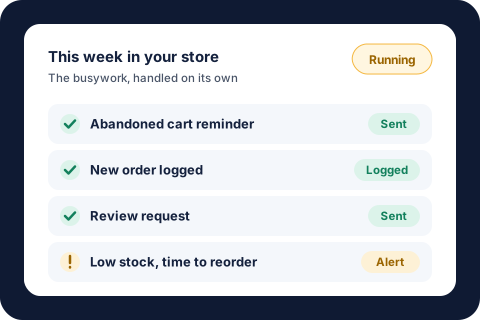
- Abandoned cart reminders that sound like you. The Baymard Institute puts the average documented cart abandonment rate at 70.22%, across 50 studies. A short, well-timed reminder (and a second one a day or two later) brings some of those shoppers back without anyone tracking who left what.
- Promotions that launch on schedule. The monthly feature, the coupon code, the site banner, and the email and social posts all go live on the right day. One store now has its product of the month launch on its own: the site and coupon codes update and the campaign goes out without anyone lifting a finger.
- Post once, publish everywhere. Approve a product video or announcement once, and it goes out to every channel with captions written for each one. One approved video now publishes to five platforms at once.
- Product descriptions and captions drafted for you. This is one place AI genuinely helps: first drafts of product copy, captions, and promotional emails in your store's voice, ready for you to edit and approve. Our AI automation page explains where we use it and where we don't.
Orders and money
- Every order logged in your books. Each sale is recorded the moment it comes in, so revenue and order counts are always current and nobody types orders into a spreadsheet at month end. One store went to zero orders typed in by hand.
- A weekly sales report in your inbox. Revenue, orders, average order value, and top sellers, built and sent every Monday morning, so you see the week without logging into three dashboards.
- Failed payment and renewal reminders. For subscription brands, a declined card or an expiring subscription triggers a polite reminder with a link to fix it, instead of a quiet cancellation nobody notices until next month.
Customers and reviews
- A review request at the right moment. Ask after the order has arrived and the customer has had time to use it, not the minute they check out. Timing is most of what makes a review request work.
- Real reviews on every product page. Shoppers trust what other buyers say. One store now has genuine reviews from around the web added to each product page, with no copy and paste.
- Win-back emails for lapsed customers. When a regular customer hasn't ordered in a while, they get a friendly note (and an offer, if you want). A past buyer already knows and trusts your store, and nobody has to remember who's gone quiet.
- Customer emails sorted and replies drafted. "Where's my order?", return requests, and product questions get sorted as they arrive, with the order details pulled in and a reply drafted for you to check and send.
Inventory
- Low-stock alerts that tell you what to reorder. Instead of discovering a sellout from an angry customer, you get a heads-up when a best seller drops below the level you set, with a reorder list ready to send.
Selling services or bookings as well as products? The same patterns show up in our guide to business processes to automate, and our e-commerce automation page shows how a full order runs from checkout to review.
Which e-commerce automation should you start with?
Start with the job that costs the most time and hurts the most when it's late or missed. Ask three questions about each idea above:
- Who does it now, and how many hours a week? If it's you, after hours, that's a strong signal.
- How often does it happen? Something that happens with every order beats something that happens once a quarter.
- What does a miss cost? A missed reorder costs sales. A forgotten review request costs social proof. An order that never reaches your books costs you a messy tax season.
For most small stores, the first project is either order bookkeeping (if you're still copying sales into a spreadsheet) or customer follow-ups (if reviews and repeat orders are thin). Promotions and posting everywhere usually come next.
A quick way to put a number on it. Say you spend 4 hours a week logging orders, answering order-status emails, and posting products. At the BLS median wage for administrative assistants of $23.23 an hour (May 2025), that's about $93 a week, or roughly $4,800 a year, before counting the sales you'd make with those hours back. Our savings calculator will run the same math with your own numbers.
What shouldn't an online store automate?
- Refund and complaint decisions. Automate gathering the order details, but let a person decide and write the reply. An upset customer can tell when they're talking to a script.
- Pricing changes. Automatic price changes can quietly wreck your margins. Get an alert and decide yourself.
- Anything you do twice a year. A checklist is cheaper than an automation for rare tasks.
- A process that's still changing. If you're switching suppliers or reworking your product line, let it settle before you automate it.
- Fake urgency or made-up reviews. Automation should save you time, not invent social proof. Only use real reviews from real buyers.
What does e-commerce automation cost?
Start with your platform's free built-in features. When you outgrow them, one automated process with us starts at $1,000, a package of 3 to 5 connected automations starts at $3,000, and Automation Care, which keeps everything monitored, fixed, and improved, starts at $500 a month. Everything is built around the store, email, and software you already use, so there's nothing new for your team to learn. Every project starts with a free audit and a fixed quote, and if it doesn't save your team time in the first 30 days, we fix it free until it does. Our guide to business automation costs explains what pushes a price up or down, and our guide to what an automation consultant does covers what you should get if you hire help.
About the author. Tyler founded KeyProcess Automation Services and has built dozens of automations, small and large, for property management and e-commerce teams. You can see what they changed on our results page.
FAQ
Common questions about e-commerce automation
What can you automate in an e-commerce business?
Abandoned cart reminders, promotions and product launches, posting to social channels, order bookkeeping, weekly sales reports, failed payment reminders, review requests, win-back emails, customer email sorting, and low-stock alerts. If you do it the same way for every order or every week, it can usually run on its own.
What is the first thing a small online store should automate?
Usually whichever job you do by hand for every order. For many small stores that is logging orders in the books or following up with customers for reviews and repeat orders. Turn on your store platform's free built-in emails first, then automate what they don't cover.
Do I need new software to automate my online store?
No. Automations can be built around the store platform, email, and accounting software you already use, so there is nothing new for your team to learn.
Is e-commerce automation worth it for a one-person store?
Often it's worth the most there, because the owner does every repetitive job. Taking a few hours a week of order logging, follow-ups, and posting off one person frees them for products, marketing, and customers.
How much does e-commerce automation cost?
Your platform's built-in features are free. With KeyProcess Automation Services, one automated process starts at $1,000, a package of 3 to 5 connected automations starts at $3,000, and Automation Care starts at $500 a month, with a free audit and a fixed quote first.
Will automation make my store feel impersonal?
Not if it's done well. Automation handles timing and busywork, like sending a review request when an order arrives, while messages stay in your voice and refunds, complaints, and special requests still go to a person.
Find out what your store could stop doing by hand
Book a free 30-minute audit. We'll walk through where your week goes, and you'll leave with a written list of what to automate first and what it could save you, whether you hire us or not.
Request your free auditOr email tyler@keyprocessautomation.com