 KeyProcess Automation Services
Blog · Hiring automation help
What does an automation consultant do? A plain-English guide for small business owners
What an automation consultant actually does week to week, what you should walk away with, what it costs, and the questions that separate a good one from an expensive mistake.
The short answer: an automation consultant finds the repetitive work that eats your team's week, decides which of it is worth automating, builds automations around the software you already use, and keeps them running. You should end up with fewer hours spent on follow-ups, paperwork, data entry, and reports, and a clear record of what changed.
Key takeaways
- A good automation consultant sells outcomes (hours back, fewer missed follow-ups), not software or a big transformation project.
- The work has five stages: audit, prioritize and quote, build, hand over, and keep it running.
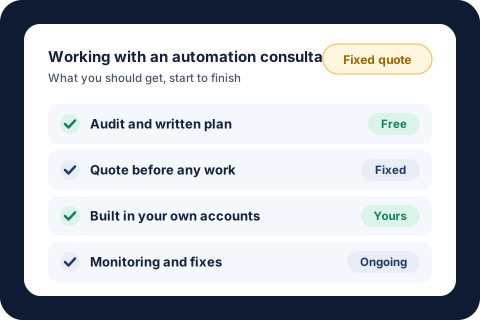
- You should get a written plan, a fixed quote, automations in your own accounts, and someone responsible when something breaks.
- For small businesses, a single automated process usually costs about the same as a few months of the admin time it replaces.
- Ask who owns the work, what happens when it breaks, and what results they've delivered before you sign anything.
What is an automation consultant?
An automation consultant is someone you hire to make the repetitive parts of your business run on their own. Think of the follow-up emails, reminders, approval paperwork, bill logging, and weekly reports that someone on your team does by hand, every week, by the same rules. The consultant's job is to take that work off their plate without making anyone learn a new system.
It's a different job from a general management consultant, who studies how a business is run and recommends changes. The U.S. Bureau of Labor Statistics puts the median pay for management analysts at $101,860 a year as of May 2025, and that work usually ends in a report. An automation consultant's work ends in something that runs. If you finish the project with a slide deck and no fewer hours of busywork, you hired the wrong kind of help.
Small businesses are the ones who need this most, and the ones least likely to have someone in-house to do it. There are 36.2 million small businesses in the U.S., employing 45.9% of private sector workers, according to the SBA Office of Advocacy's 2026 FAQ. Most of them don't have an operations team, so the owner or one key person ends up doing the admin work at night. Hiring help for that work is getting harder, too. In the NFIB's April 2026 jobs report, 34% of small business owners had openings they couldn't fill.
What does an automation consultant actually do?
Most engagements follow the same five stages. The names vary, but if a consultant skips one of these, ask why.
1. Audit how the work gets done today
The consultant sits down with you (usually on a call) and walks through where your team's hours go. Which tasks repeat every week? Which ones depend on one person? Where do things fall through the cracks? A good audit is about your business, not about software. You should leave it understanding your own processes better than you did before. Our guide to what an automation audit should include covers it in detail, with a worksheet to run your own.
2. Pick what to automate first and quote it
Not everything is worth automating. A good consultant ranks the candidates by hours saved, how often the task happens, how clear its rules are, and what a mistake costs, then recommends one or two to start. Our guide to business processes to automate includes the five-question scorecard we use for this, and online stores can start with our 12 e-commerce automation ideas. You should get a fixed price and a plain description of what will change before any work starts.
3. Build it around the software you already use
The automation gets built to work with your existing email, spreadsheets, forms, and business software. You shouldn't have to switch systems, and your team's day should mostly look the same, minus the repetitive part. For example, one property management team used to spend 1.5 to 2 hours preparing the paperwork for each approved lease. Now it takes 5 to 10 minutes, across 300 to 400 leases a year, and the team still does its job in the same software it always did.
4. Test it, hand it over, and show your team
Before it goes live, the automation should run against real examples, including the awkward ones. Your team should know what it does, what they still review or approve, and who to call when something looks off. This is where a lot of DIY automation falls down: it works for the person who built it and nobody else.
5. Keep it running and improve it
Automations depend on other systems, and other systems change. A form gets edited, a report changes format, or a vendor changes how they send emails. Someone needs to notice when that breaks something and fix it before your team does. That's what an ongoing care plan is for. It's also where the second and third automations usually come from, once the first one has proven itself.
What should you get at the end of an automation project?
Whoever you hire, you should be able to point to these:
- A written plan. A list of what's worth automating, in order, with what each could save. You should get this even if you don't hire them for the build.
- A fixed quote and a clear scope. What will change, what won't, and what it costs, in writing.
- Automations in your own accounts. Built in your business's own accounts, so your data stays yours and nothing disappears if you part ways.
- Measurable results. Hours saved, tasks no longer done by hand, or follow-ups that now go out on time. One team now has 100 to 250 vendor follow-ups sent every Monday without anyone writing them, which saves about 8 hours a month.
- Someone responsible after launch. A named person who monitors the automations and fixes them when something upstream changes.
What does an automation consultant cost?
It depends on how they charge. Some bill by the hour, some quote a fixed price per project, and many offer a monthly plan for ongoing support. For a small business, a fixed project price is usually the safer choice, because you know the cost before anything gets built and the consultant carries the risk of it taking longer.
With us, one automated process starts at $1,000, a package of 3 to 5 connected automations starts at $3,000, and Automation Care, which keeps everything monitored, fixed, and improved, starts at $500 a month. Every project starts with a free audit and a fixed quote. If an automation doesn't save your team time in the first 30 days, we fix it free until it does. Our full guide to business automation costs explains what pushes a price up or down, and some custom projects may also qualify for the federal R&D tax credit.
A quick way to judge the price. The BLS median wage for administrative assistants was $23.23 an hour in May 2025. If an automation takes 4 hours a week of that work off someone's plate, that's about $93 a week, or around $4,800 a year in wages alone. A $1,000 project pays for itself in under three months. Try your own numbers in our savings calculator, or follow our step-by-step guide on how to calculate automation ROI.
Do you need an automation consultant, or can you do it yourself?
You can often do it yourself, and for very simple tasks, you should. If you're comfortable with software and the task is a single, clean step (copy a form entry into a spreadsheet, for example), a weekend of tinkering may be all it takes.
Hiring help makes more sense when:
- The process has exceptions, approvals, or more than a couple of steps.
- A mistake costs money or a customer, so it has to work every time.
- Your software doesn't connect easily to anything else.
- Your time is worth more spent on sales, customers, or the work only you can do.
- You've tried before and it broke, or only one person understands how it works.
The hidden cost of DIY is upkeep. An automation that quietly stops working is worse than no automation, because everyone assumes the job is getting done. In the Federal Reserve's 2025 Small Business Credit Survey, hiring or keeping qualified staff was the second most common operational challenge employer firms reported. If your team is already stretched, nobody has time to babysit a homemade setup.
How do you choose a good automation consultant?
Ask these questions before you sign anything. A good consultant will answer them plainly.
- What results have you delivered for businesses like mine? Look for specific outcomes (hours saved, tasks removed) rather than logos or vague claims. You can see ours on our results page.
- Is the price fixed? Open-ended hourly billing on a first project is a risk you shouldn't have to carry.
- Whose accounts will this live in, and what happens if we stop working together? Get the answer in writing, including what you keep and what it costs to take over the work yourself.
- Will we have to change software? For most small businesses, the answer should be no.
- What happens when something breaks? Ask who notices, how fast it gets fixed, and whether that's included or extra.
- What wouldn't you automate for us? A consultant who says yes to everything is selling, not advising.
Red flags worth walking away from: a long discovery phase you pay for before seeing any plan, a push to buy new software as step one, no examples of real results, and a contract that's vague about who owns what.
What about AI automation consultants?
An AI automation consultant does the same job, with AI added for the steps that involve reading or writing: drafting a social caption, pulling the details out of a messy email, or summarizing a long thread for a person to approve. That's genuinely useful, but it's a tool, not the goal. Plenty of the most valuable automations, like reminders, follow-ups, and reports, don't need AI at all.
Be wary of anyone who leads with AI before they've asked how your business runs. The right question is "what's eating my team's week?" and the answer decides whether AI belongs in the solution. Our AI automation page shows where we use it and where we don't. If you want AI that owns whole jobs across a department, with you approving its work, see what an AI employee does in each department.
About the author. Tyler founded KeyProcess Automation Services and has built dozens of automations, small and large, for property management and e-commerce teams. You can see what they changed on our results page.
FAQ
Common questions about automation consultants
What does an automation consultant do?
An automation consultant finds the repetitive work in your business, such as follow-ups, reminders, paperwork, data entry, and reports, decides which of it is worth automating, builds automations around the software you already use, and keeps them running so your team gets those hours back.
How much does an automation consultant cost?
It depends on whether they bill hourly, by project, or monthly. With KeyProcess Automation Services, one automated process starts at $1,000, a package of 3 to 5 connected automations starts at $3,000, and Automation Care starts at $500 a month, with a free audit and a fixed quote first.
Is an automation consultant worth it for a small business?
Usually, if the work being automated takes a few hours a week or more. At the BLS median wage for administrative assistants of $23.23 an hour, saving 4 hours a week is worth about $4,800 a year in wages, so a $1,000 project pays for itself in under three months.
What is the difference between an automation consultant and an IT consultant?
An IT consultant usually looks after your computers, networks, security, and software setup. An automation consultant focuses on the work your team does by hand every week and makes it run on its own, without replacing the software you already use.
Do I need to switch software to work with an automation consultant?
No. A good automation consultant builds around the email, spreadsheets, forms, and business software you already use, so your team doesn't have to learn a new system.
How long does an automation project take?
A single, well-defined process usually goes from first conversation to running on its own in a few weeks, depending on how many steps and exceptions it has. A free audit gives you a fixed quote and timeline.
See what an automation consultant would find in your business
Book a free 30-minute audit. We'll walk through where your team's hours go, and you'll leave with a written list of what to automate first and what it could save you, whether you hire us or not.
Request your free auditOr email tyler@keyprocessautomation.com